How to audit a website step by step: a 30-point checklist for SMEs
A checklist for reviewing your website with Google's free tools: whether it gets indexed, whether it loads well on mobile, whether the content answers what your clients search for, whether your Google Business Profile matches the site and whether AI assistants can see you.
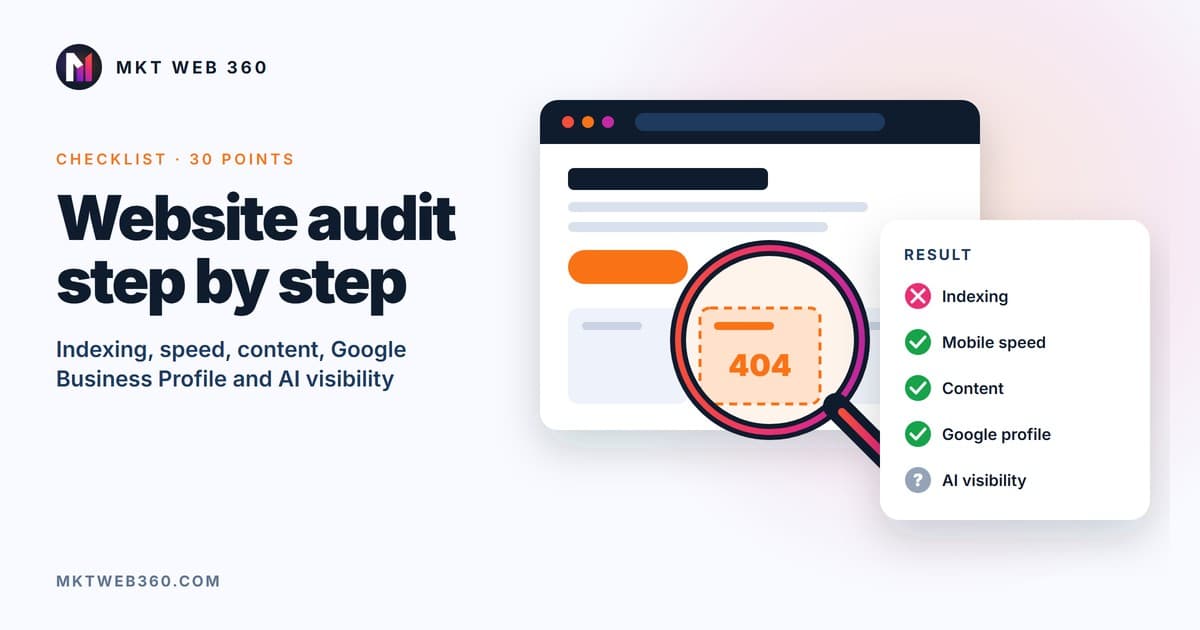
A website audit is an orderly review of everything that stops your site from appearing on Google and turning visits into clients. A basic audit covers five blocks: indexing, speed, content, local presence and AI visibility. Each check has one of four results: pass, fail, unknown or not applicable. Fix first what fails and matters most.
Quick summary
- ▸You need four free tools: Google Search Console, PageSpeed Insights, the Rich Results Test and a crawler such as Screaming Frog, which is free up to 500 URLs.
- ▸Start with indexing: if Google does not have your page, nothing else matters.
- ▸Speed is measured with Core Web Vitals and the thresholds Google publishes, not with the 0-100 score.
- ▸If you have a local business, your Google Business Profile is part of the audit.
- ▸Since 31 August 2026, Search Console shows every website how often it appears in Google's AI features.
- ▸"Unknown" is not the same as "fail": note which piece of data is missing and go and get it.
What you need before you start
| Tool | What it is for in the audit | Cost |
|---|---|---|
| Google Search Console | Indexing, the searches you appear for, errors and AI visibility | Free |
| PageSpeed Insights (pagespeed.web.dev) | Core Web Vitals from real users (if your site has enough traffic) and lab data | Free |
| Rich Results Test (search.google.com/test/rich-results) | Checking that structured data is valid | Free |
| Screaming Frog SEO Spider | Crawling the site the way a search engine would: titles, broken links, redirects | Free up to 500 URLs per crawl |
If you do not have Search Console yet, set it up before anything else. It is the only source with Google's real data about your site. Other SEO tools estimate.
How to record the results
Open a spreadsheet with five columns: check, result, evidence (screenshot or figure), priority and owner. Always use the same four results:
| Result | When to use it |
|---|---|
| Pass | You have checked it and it is fine |
| Fail | You have checked it and it needs fixing |
| Unknown | You could not check it (an access or a piece of data is missing). Do not count it as good or bad |
| Not applicable | That check does not apply to your site (for example, Google Business Profile for an online store with no premises) |
Block 1 · Indexing and crawling (8 checks)
If Google cannot crawl or index a page, that page does not exist for it.
- 1.The property is in Search Console and verified. Verifying it by HTML file or DNS is best.
- 2.Page indexing report: review the reasons pages are not indexed. Look especially at "Crawled - currently not indexed" and "Discovered - currently not indexed" for pages that matter to you.
- 3.Sitemap submitted with no errors (Indexing › Sitemaps). It should only include URLs you want indexed that return a 200.
- 4.robots.txt does not block important pages. Google points out that robots.txt is not a way to keep a page out of Google: for that you use
noindexor a password. - 5.No key page carries a
noindexby mistake. It happens a lot after a redesign, when the staging configuration gets copied over. - 6.A single version of each URL: with or without a trailing slash, with or without www, http or https. All of them should 301-redirect to the right version. If the Performance report shows the same page with and without a slash getting impressions separately, it fails.
- 7.The page looks the same to Google: use URL Inspection › Test live URL and check the screenshot and the HTML Google receives. Important content must be in the HTML, not loaded only with JavaScript.
- 8.No broken internal links or redirect chains (Screaming Frog crawl: 4xx codes and chained redirects).
Block 2 · Speed and mobile experience (6 checks)
Google indexes and ranks based on the mobile version of your site, so always measure on mobile.
- 9.LCP (loading of the main content) ≤ 2.5 s.
- 10.INP (response to a tap or click) ≤ 200 ms.
- 11.CLS (visual stability, nothing jumping while it loads) ≤ 0.1. Google publishes these three thresholds on web.dev and they are measured at the 75th percentile of real visits.
- 12.Search Console Core Web Vitals report with no URLs under "Poor". If your site has little traffic, the report may be empty: mark it "unknown" and use PageSpeed Insights lab data as a guide.
- 13.Images of reasonable weight in a modern format (WebP or AVIF), especially the main image on each page.
- 14.HTTPS across the whole site, with no mixed-content warnings.
A warning from Google itself: good Core Web Vitals help, but they do not guarantee you will be at the top. They carry more weight when several equally useful pages are competing.
Be found on Google, in AI and on the map
SEO positioning, GEO so that any AI assistant can find and cite you, and your Google Business Profile optimised. One monthly service.
From €149/month + VATWith a 6-month commitment · or €349/month with no commitment
Request free diagnosisBlock 3 · Content and on-page SEO (8 checks)
This block checks whether each page clearly states what it offers and which search it answers.
- 15.Each page has its own short, descriptive title. Google advises against repeating words or stuffing keywords.
- 16.One H1 per page that says what is offered or answered.
- 17.One main search per page. If two of your pages compete for the same search (you will see it in Performance › Queries › Pages), it fails: merge or differentiate them.
- 18.The intent matches. If a guide shows up for searches about hiring a service, or the other way round, Google will rank it far from the top 10.
- 19.Service pages answer the client's questions: what is included, who it is for, timelines, price or how it is calculated, and how to hire.
- 20.Internal linking: every important page receives links from your other pages with text that describes the destination. No page is left orphaned.
- 21.Valid structured data (Organization or LocalBusiness, BreadcrumbList, FAQPage if there are visible questions). What the markup says must match what can be read on the page.
- 22.Searches with many impressions and few clicks (Performance, last 3 months) have a page that genuinely answers them. They are your opportunity list. To find new searches, you can use the Google Ads Keyword Planner.
Block 4 · Local SEO and Google Business Profile (4 checks)
If you serve clients in an area, people searching on the map see your profile before your website. If you only sell online with no premises, mark this block as "not applicable".
- 23.The profile name is your business's real name, with no added towns or services. It is a Google guideline.
- 24.A correct address or service area, and the same name, phone number and address on your website, your profile and the main directories.
- 25.Category, services and opening hours complete and up to date.
- 26.Reviews answered, without asking only happy clients or offering anything in return. Google's policy prohibits offering incentives for reviews and selectively asking satisfied customers. We explain it in how to get Google reviews legally.
Block 5 · AI visibility (4 checks)
AI assistants already answer many searches before the person reaches a website. This block checks whether they can read you and whether they cite you.
- 27.Search Console generative AI report. Available to all websites since 31/08/2026. It shows how often your URLs appeared in AI Overviews, AI Mode and Discover, by page, country, device and date. It only gives impressions: no clicks or queries.
- 28.Your pages can appear in Google's AI features. According to Google, the page only has to be indexed and eligible to be shown in Search with a snippet; there are no additional technical requirements. Check you do not have restrictive
nosnippetormax-snippetsettings by mistake. - 29.robots.txt does not block the AI search crawlers you care about: OAI-SearchBot (ChatGPT), PerplexityBot, Claude-SearchBot and Claude-User (Claude). Blocking training crawlers is a separate business decision. Google-Extended does not affect Google Search.
- 30.Manual test with 5 client questions in ChatGPT, Perplexity, Gemini and Google's AI Mode: brand, service, problem, area and comparison. Note whether they mention you, whether the details are correct and which sources they cite. The full method is in our GEO audit guide.
How to prioritise what you found
Sort the "fail" items with two questions: how much does it affect people finding or contacting you? How much does it cost to fix?
| Priority | What usually goes here |
|---|---|
| 1 · Now | Key pages not indexed, noindex or blocks by mistake, duplicate URLs without redirects, contact form that does not arrive |
| 2 · This month | Confusing titles and H1s, pages competing with each other, high LCP due to heavy images, Google Business Profile with details different from the website |
| 3 · Plan | Expand service pages, internal linking, structured data, content for searches with impressions and no clicks |
"Unknown" items go on a separate list with the missing piece of data, for example "no access to Search Console" or "too little traffic for Core Web Vitals". Do not mix them with failures.
How often to repeat the audit
Do a full audit once a year, and also before and after a redesign, a migration or a domain change. Blocks 1 and 5 are worth reviewing every month in Search Console: they change without you touching anything. If you are starting to work on SEO, here is how long it takes to show results and what moves first. And for an overview of where to start, see our SEO guide for SMEs.
When a professional audit makes sense
This checklist tells you what is wrong. What usually takes more effort is knowing why it happens and what to fix first in your case, especially with migrations, many pages or contradictory data.
Want a second opinion on your website?
Our free audit reviews the technical state, your visibility in Google and in AI assistants, your Google Business Profile and three search opportunities. You receive it by email within 24 working hours, with no commitment. If you then want us to take care of it, our SEO plans and prices are published.
Request the free auditFrequently asked questions
What is the difference between a website audit and an SEO audit?
Can I audit my website for free?
How often should a website be audited?
Does a low PageSpeed Insights score mean Google is penalising me?
How do I know if my website appears in Google's AI answers?
Sources
- web.dev: Web Vitals. https://web.dev/articles/vitals
- Google Search Central Blog: Introducing Search Generative AI performance reports in Search Console (03/06/2026). https://developers.google.com/search/blog/2026/06/gen-ai-performance-reports
- Google Search Central: AI features and your website. https://developers.google.com/search/docs/appearance/ai-features
- Google Search Central: Introduction to robots.txt. https://developers.google.com/search/docs/crawling-indexing/robots/intro
- Google Search Central: Mobile-first indexing. https://developers.google.com/search/docs/crawling-indexing/mobile/mobile-sites-mobile-first-indexing
- Google Search Central: Page experience. https://developers.google.com/search/docs/appearance/page-experience
- Google Search Central: Title links. https://developers.google.com/search/docs/appearance/title-link
- Google Business Profile Help: Guidelines for representing your business on Google. https://support.google.com/business/answer/3038177
- Google: Prohibited and restricted content (review manipulation). https://support.google.com/contributionpolicy/answer/7400114
- Screaming Frog: SEO Spider. https://www.screamingfrog.co.uk/seo-spider/
Related services: Free SEO audit · SEO · GEO