How to use Google Keyword Planner (2026): a step-by-step guide
By José Marcos
How to get in without creating a campaign, how to pull keyword ideas and volumes, and how to read the data properly: why it comes in ranges, what “competition” actually measures and when Search Console is the better source.
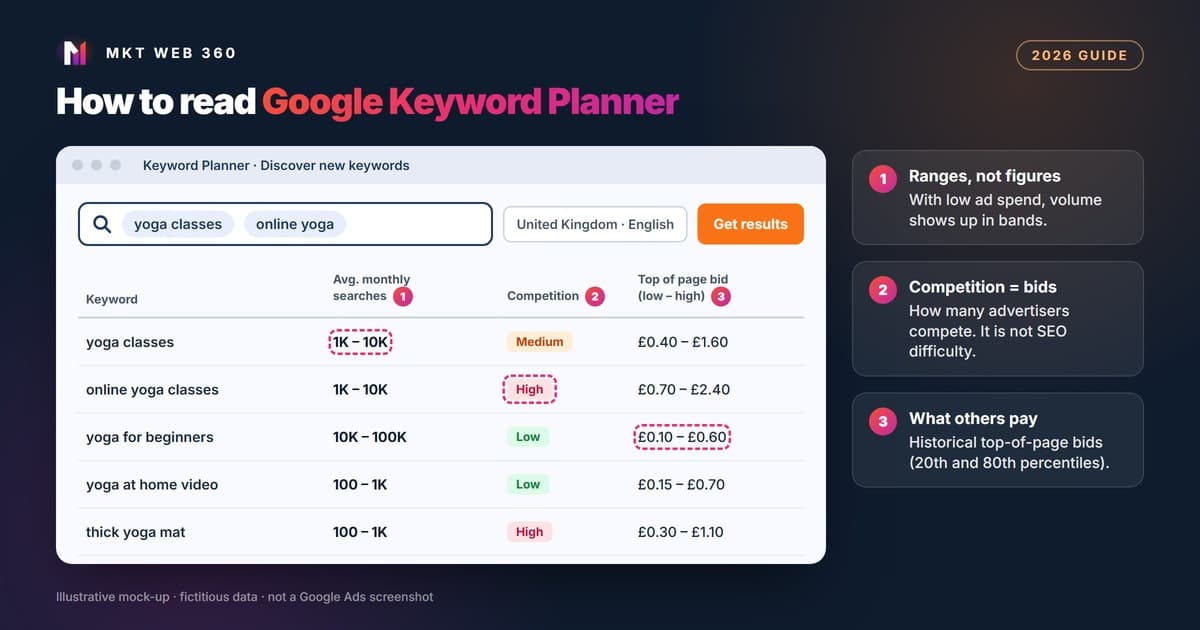
Keyword Planner is a free Google Ads tool that suggests searches related to your business and estimates how often they are searched each month and what advertisers pay for them. You don’t need an active campaign, but you do need to finish account setup with your billing details. If you spend little on ads, volumes appear as ranges.
Quick summary
- ▸It is free and does not require an active campaign, but you must complete your account with billing details.
- ▸It has two functions: discover new keywords and get search volume and forecasts for a list.
- ▸With low ad spend, volume shows as ranges (for example, 1K – 10K). That is usually enough to choose topics.
- ▸“Competition” means competition between advertisers bidding on ads. It is not SEO difficulty.
- ▸For SEO, cross-check it with Search Console, which shows the searches your site already appears for and its position.
What is Google Keyword Planner and what is it for?
It is the tool Google includes in Google Ads to plan Search campaigns. It does two things: find new keywords from a few terms or a website, and show volume and forecasts for a list you already have. Although it is built for ads, it is also used in SEO to learn how people search for a service, group searches by topic and see in which months demand rises.
Its data comes from Google, but it has limits: volumes are rounded, keywords with very low volume or considered sensitive are not shown, and the competition column is about ads, not organic results.
How do you get in without creating a paid campaign?
- 1.Go to ads.google.com with your Google account and create the Google Ads account.
- 2.During sign-up, Google gives you the option to create the account without a campaign. Choose it: you don’t need to prepare any ad. If the setup wizard takes you straight into building a campaign, look for that option at the bottom of the screen.
- 3.Complete setup with your billing country, time zone and payment method. Google requires this step for basic features such as keyword ideas. With no active campaigns, no ads are served.
- 4.Open the Tools menu and select Keyword Planner.
Once your account is ready, you can also go straight to ads.google.com/aw/keywordplanner/home. If you can’t see keyword ideas, the usual reason is that billing setup is not finished.
Step by step: how do you discover new keywords?
- 1.Choose Discover new keywords.
- 2.Start in one of two ways: with keywords (type a few words that describe your service, the way a customer would say them) or with a website (paste a domain or URL, including a competitor’s, and Google will draw ideas from its content).
- 3.Set the language and location. If you serve a whole country, keep the country; if you serve one area, narrow it down. Volume changes a lot from one market to another.
- 4.Review the results and add filters to cut the noise: by text (exclude brands or terms you don’t offer), by competition or by impression share. The side panel lets you refine by category.
- 5.Save the ones you want to Saved keywords or download the list to work on it in a spreadsheet.
A practical tip: start with short, broad terms and let the tool show you the variations. Longer searches usually have less volume but clearer intent, and they are the easiest to target with a specific page.
Step by step: how do you get search volume and forecasts?
- 1.Choose Get search volume and forecasts.
- 2.Paste your list or upload a CSV with a column called “Keyword”. Each keyword can have at most 80 characters and 10 words.
- 3.In the historical metrics you will see average monthly searches, competition and bids for each term.
- 4.In the forecast you will see what a campaign with those keywords could deliver: clicks, impressions, cost, CTR and average CPC, based on the bid and budget you set.
What to know about forecasts, according to Google Ads Help:
- ▸They are refreshed daily using data from the last 7–10 days, adjusted for seasonality.
- ▸They take bid, budget, seasonality and ad quality history into account. Historical search volume takes none of that into account.
- ▸In a new account they start from other advertisers’ averages until there is enough data of your own.
- ▸They are less accurate if you target a small geographic area, because there is less data.
Use them to work out how much budget a Search campaign would need. If you are thinking about advertising, see our Google Ads management service.
How do you read the data: ranges, “competition” and bids?
| Column | What Google says | How to use it |
|---|---|---|
| Avg. monthly searches | Average searches for the keyword and its close variants, over 12 months by default. Figures are rounded | To compare topics and spot seasonal peaks, not as an exact figure |
| Volume range (1K – 10K) | Limited data view for advertisers with lower monthly spend | Enough to choose between topics. To refine, check real impressions in Search Console |
| Competition (low, medium, high) | How many advertisers showed on that keyword relative to all keywords across Google | Shows commercial interest in ads. Says nothing about how hard it is to rank organically |
| Top of page bid (low and high range) | Approximately the 20th and 80th percentile of what advertisers have paid, based on the last 30 days | Guides cost per click if you run Google Ads and flags which searches have commercial value |
About ranges. Google’s help pages do not say what level of spend unlocks exact figures. The Google notice reported by Search Engine Journal in 2016 says advertisers with lower monthly spend may see a limited data view. In practice you will see bands such as 100 – 1K or 1K – 10K. To decide which topic to work on first, that is enough.
About “competition”. This is the most common mistake. “High competition” means many advertisers bid on that search, which usually signals commercial value. It does not tell you whether it is hard to rank in organic results. For that, look at who holds the first page or use an SEO difficulty metric such as Semrush’s KD %.
Keyword Planner, Search Console or Semrush: which data for what?
| What you need to know | Keyword Planner | Search Console | Semrush |
|---|---|---|---|
| Discover searches you don’t target yet | Yes: its main function | Only searches you already appear for | Yes, from its own database |
| Search volume for a query | Google data, in ranges if you spend little | No total volume; shows your impressions | Its own estimate from third-party data |
| Which searches your site already appears for | No | Yes: real queries, impressions, clicks, CTR and average position | Estimate based on its database |
| How hard it is to rank organically | No (its “competition” is about ads) | No | Yes: KD %, from 0 to 100 |
| Cost per click and ad budget | Yes: bids and forecasts | No | Indicative |
| Price | Free with a Google Ads account | Free | Paid, with limited free access |
Our order: first Search Console, to see which searches your site already appears for (those with many impressions and few clicks are the quickest wins); then Keyword Planner, to find searches you don’t target yet and gauge demand; and finally an SEO tool, to estimate difficulty before creating the page. Our step-by-step website audit explains how to review Search Console.
More visibility on Google, without paying per click
Technical audit, keyword strategy, on-page optimisation and link building to attract customers organically and sustainably.
View SEO service5 common mistakes when using Keyword Planner
- 1.Reading “competition” as SEO difficulty. An informational search can have low ad competition and still be dominated organically by media and big brands. And the other way round.
- 2.Treating ranges as figures. “1K – 10K” could be 1,200 or 9,500. Use it to rank topics by demand, not to promise traffic.
- 3.Using forecasts to estimate SEO traffic. They estimate what a paid campaign would deliver with a given bid and budget. Organic traffic depends on your position and the rest of the results page.
- 4.Not checking location and language. If you sell in one country and look at data from other countries or another language, the list is not useful.
- 5.Creating one page per variation. “Keyword planner” and “how to use keyword planner” are the same search need. Group variations with the same intent on a single page; otherwise your own pages compete with each other.
Want to know which searches your website can win?
Our free diagnosis reviews your technical health, your visibility in Google and in AI assistants, your Google Business Profile and three search opportunities. You receive it by email within 24 working hours at most, with no commitment.
Request the free diagnosisFrequently asked questions
Is Google Keyword Planner free?
Why does Keyword Planner show ranges like 1K – 10K instead of exact figures?
Does Keyword Planner’s “competition” tell me how hard it is to rank in SEO?
What is the difference between search volume and forecasts?
Can I use Keyword Planner for SEO even though it is a Google Ads tool?
Sources
Checked on October 28, 2026.
- Google Ads Help: Use Keyword Planner (access, functions, limits, billing and forecast refresh). https://support.google.com/google-ads/answer/7337243?hl=en
- Google Ads Help: About Keyword Planner forecasts (monthly searches, competition, bids and forecasts). https://support.google.com/google-ads/answer/3022575?hl=en
- Google Ads Help: Create a Google Ads account (option to create an account without a campaign). https://support.google.com/google-ads/answer/6366720?hl=en
- Search Engine Journal (15/08/2016), reporting Google’s notice that advertisers with lower monthly spend may see a limited data view. https://www.searchenginejournal.com/googles-keyword-planner-tool-providing-limited-data-low-spending-advertisers/170837/
- Search Console Help: Performance report (clicks, impressions, CTR and average position for your site). https://support.google.com/webmasters/answer/7576553?hl=en
- Semrush Knowledge Base: What is KD%? https://www.semrush.com/kb/1158-what-is-kd
- Semrush Knowledge Base: How Semrush calculates search volume. https://www.semrush.com/kb/683-search-volume
Related services: Google Ads · SEO · Free digital diagnosis