Google Ads AI Max: what changes in your Search campaigns and how to stay in control
By José Marcos
Google is moving Search campaigns to AI Max, in some cases automatically. Here is what each feature does, which dates Google has given and what to check before letting AI expand your ads.
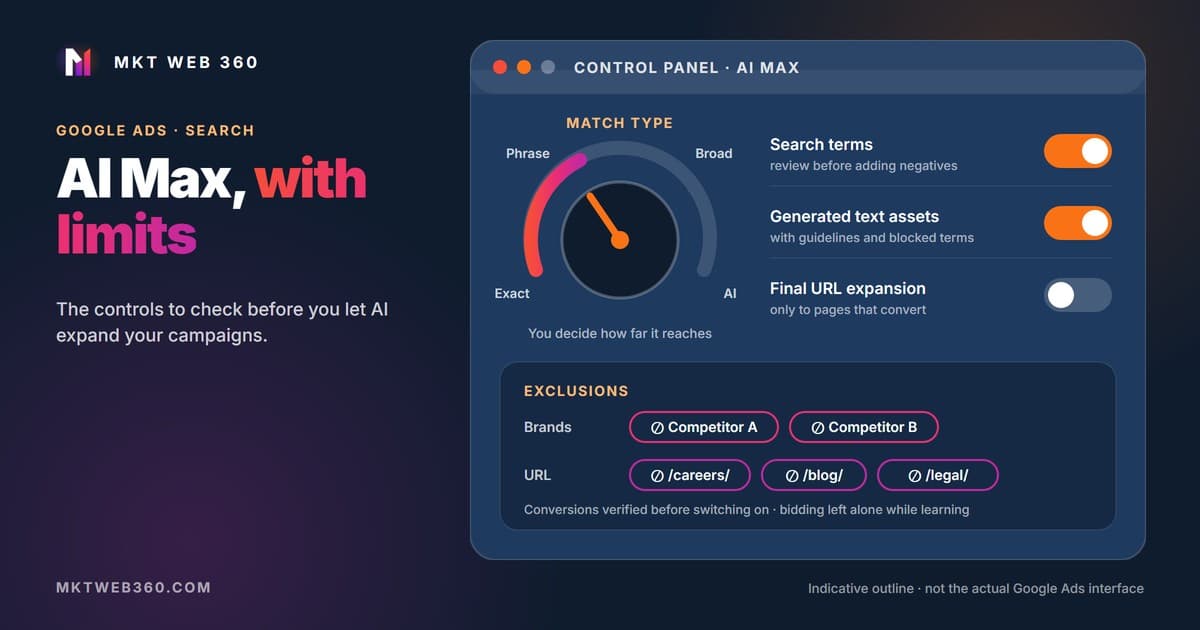
AI Max is a set of Google Ads features you turn on inside a Search campaign, not a new campaign type. It widens the searches your ad can show for, writes text based on your website and can send users to a different page on your domain. All of it can be limited with settings and exclusions.
Quick summary
- ▸Three features you can switch on separately: search term matching, text customization and final URL expansion.
- ▸According to Google, new Search campaigns have it turned on by default.
- ▸Automatic migration: Google is upgrading campaigns with automatically created assets and campaign-level broad match from September 2026, and campaigns with Dynamic Search Ads from February 2027.
- ▸Search term matching does not work with manual CPC: Google recommends conversion-based bidding.
- ▸Our rule: never turn it on without verified conversion tracking, because the AI learns from those conversions.
What is AI Max in Google Ads?
Google describes it as an optimization layer for Search campaigns that bundles targeting and creative enhancements. It has three features:
- 1.Search term matching. Expands your keywords with broad match and keywordless technology, which uses your ads, keywords and website to find new searches. It can be switched off per ad group.
- 2.Text customization (formerly “automatically created assets”). Generates headlines and descriptions from your ads, landing pages and assets.
- 3.Final URL expansion. Sends users to the page on your domain that best matches their search, within the ad group theme. It requires text customization: if you switch that off, final URL expansion goes off too.
AI Max also adds controls Search campaigns did not have before: brand exclusions and inclusions, URL exclusions and inclusions, locations of interest per ad group, and guidelines for generated text.
How is it different from broad match and DSA?
| Campaign-level broad match | DSA | AI Max | |
|---|---|---|---|
| What it is | A setting that treats every keyword in the campaign as broad | An ad type that targets searches based on your website content | A layer of features inside a Search campaign |
| How searches are chosen | From your keywords | From your website pages | Keywords, broad match and keywordless matching |
| Ad text | Written by you | Headlines generated from your website | Your responsive ads plus text customization |
| Landing page | Set by you | Chosen by Google on your site | Yours, or the one chosen by final URL expansion |
| Main controls | Negative keywords | Page targets and exclusions | Negatives, brand and URL exclusions, inclusions, locations of interest and text guidelines |
| What happens next | Upgraded to AI Max from September 2026 | Upgraded to AI Max from February 2027 | Where the other two end up |
An easily missed detail if you used the campaign-level broad match setting: with it, Google prioritizes each keyword as if it were both exact and broad. Once the campaign moves to AI Max, that stops. To keep that priority, Google suggests adding exact match copies of those keywords. If you are building your keyword list from scratch, see our guide to the Google Ads Keyword Planner.
Automatic migration: what will Google do and when?
On 15 April 2026 Google announced that DSA, automatically created assets and campaign-level broad match would move to AI Max from September 2026. On 11 June it updated that announcement: DSA is pushed back to February 2027, while the rest keeps September 2026. That is why you will find articles with different dates. This is the schedule currently shown in Google's help centre and blog:
| What you have | Upgrade to AI Max, per Google | What it becomes |
|---|---|---|
| Automatically created assets (now text customization) | September 2026 | AI Max with search term matching and text customization on |
| Campaign-level broad match | September 2026 | AI Max with search term matching on |
| Dynamic Search Ads (DSA) | February 2027 (previously announced for September 2026) | Dynamic ad groups → standard ad groups; DSA → responsive search ads; all three features on and your existing URL controls kept |
You can move first: Google offers an upgrade tool for DSA and an in-account banner for the rest. When a DSA campaign is upgraded, the old dynamic ads keep running during a transition period and are paused once the new responsive ads are eligible. Dates may change again: check the notices in your account and the Google Ads help centre before planning.
7 checks before turning on AI Max
They apply whether you switch it on yourself or Google migrates your campaign:
- 1.Verified conversion tracking. Every form, call or purchase is recorded once, with its value and no duplicates. Test it yourself before switching anything on. Without reliable data, the AI optimizes towards the wrong things.
- 2.Conversion-based bidding, outside the learning period. Search term matching does not work with manual CPC. And our rule: while a Smart Bidding strategy is learning (because it is new or you just changed it), leave it alone and do not turn on AI Max until learning ends.
- 3.A budget that is not limited. Google warns that AI Max will not be effective if the campaign is limited by budget. If you already run out of budget every day, wider matching just spreads the same money across more searches.
- 4.Search terms reviewed before adding negatives. Google recommends waiting at least two weeks after turning on AI Max before making changes such as adding negatives. Then review the search terms report and exclude what is unrelated to your business, not just what you had not thought of.
- 5.Brand exclusions. Set at campaign level (inclusions also per ad group). Decide whether you want to show for competitor searches and for brands you do not sell.
- 6.Final URL expansion and URL exclusions. Exclude pages you do not want paid traffic on: careers, blog, legal notices or services you no longer offer. Also check that your tracking templates work with the URLs Google picks.
- 7.Generated text under control. Review the assets Google AI has created in the asset report. With text guidelines (beta) you can block up to 25 terms and set up to 40 messaging restrictions per campaign: prices, timeframes or promises you cannot keep.
To measure the effect before deciding, Google lets you run an AI Max experiment that splits the campaign's own traffic and budget between a share with AI Max and one without it, without duplicating the campaign. If you do not apply the result, the campaign goes back to its previous settings.
How do you read the AI Max reports?
There are four places to see what the AI has done:
- ▸Search terms. Filter the match type “AI Max” to see the searches it added. The search terms and ad combinations view also shows the headline and landing page used.
- ▸Keywords. At the bottom of the table there are two total rows: AI Max expanded matches and AI Max landing page matches.
- ▸Assets. At campaign level, a tab lists the expanded final URLs. In the ad-level report, generated text is marked as added by Google AI.
- ▸Landing pages. Shows performance per URL, including final URL expansion, and a column tells you whether AI Max selected it.
And what usually comes next, depending on what you see:
| What you see | What to do |
|---|---|
| Searches unrelated to your business | Add negatives, after reviewing the report |
| Ads on competitor searches you do not want | Brand exclusion in the campaign |
| Traffic to pages that do not convert | URL exclusion or switch off final URL expansion |
| Text with promises you cannot keep | Remove the asset and add a text guideline |
| Cost per conversion rises after the test | Compare with an experiment and switch off the feature causing it |
Is AI Max worth it for a small business?
Google states that non-retail advertisers who activate AI Max typically see 14% more conversions or conversion value at a similar CPA or ROAS (Google internal data, 2025). It is Google's own average across many advertisers, not a forecast for your account. What decides whether it suits you is your starting point:
| Criterion | Worth testing | Better to wait |
|---|---|---|
| Conversions | Tracked, reliable and with enough volume | Not tracked, or forms that are not recorded |
| Bidding | Conversion-based and stable | Manual CPC or a strategy you just changed |
| Budget | Not used up every day | Limited by budget daily |
| Website | Clear service pages, one per service | Thin content or pages mixing services |
| Time | Someone reviews search terms and text every week | Nobody reviews the account |
If you are still deciding between ads and organic search, we compare them in when to choose SEO or Google Ads. And if you are worried about what the agency takes, see what Google Ads with no commission on budget means.
Would you rather have someone review AI Max for you?
In our Google Ads management we verify conversion tracking, set up exclusions and add negatives based on real search terms. Fixed monthly fee, no commission on your ad spend.
See Google Ads managementFrequently asked questions
Is AI Max a new campaign type?
Can I turn AI Max off?
Does AI Max work with manual CPC?
Are my negative keywords respected?
What happens if I do nothing with my Dynamic Search Ads?
Sources
Checked on 28 October 2026.
- Google Ads Help: About AI Max for Search campaigns. https://support.google.com/google-ads/answer/15910366
- Google Ads Help: How AI Max for Search campaigns works (brand, URL and location controls). https://support.google.com/google-ads/answer/15910187
- Google Ads Help: Set up AI Max for Search campaigns (DSA upgrade, text customization, final URL expansion). https://support.google.com/google-ads/answer/15909989
- Google Ads Help: Frequently asked questions about AI Max. https://support.google.com/google-ads/answer/15913066
- Google Ads Help: About reporting in AI Max for Search campaigns. https://support.google.com/google-ads/answer/16470459
- Google Ads Help: Text guidelines (beta). https://support.google.com/google-ads/answer/16489313
- Google Ads Help: About AI Max experiments. https://support.google.com/google-ads/answer/16450159
- Google Ads Help: About the broad match keywords campaign setting (upgrade to AI Max from September 2026). https://support.google.com/google-ads/answer/13389795
- Google Ads Help: About Dynamic Search Ads (upgrade to AI Max from February 2027). https://support.google.com/google-ads/answer/2471185
- Google blog: Dynamic Search Ads are upgrading to AI Max (15/04/2026, updated 11/06/2026). https://blog.google/products/ads-commerce/dsa-upgrade-to-ai-max-2026/
- Google Ads Developer Blog: DSA Automigration Delayed to February 2027 (11/06/2026). https://ads-developers.googleblog.com/2026/06/dynamic-search-ads-dsa-automigration.html
Related services: Google Ads management · Free digital audit