How to build a content strategy for your business (with an editorial calendar template)
By José Marcos
Five steps to stop publishing for the sake of it: what to talk about, in which format, when, and how to tell whether it works. With an editorial calendar template you can copy into your spreadsheet.
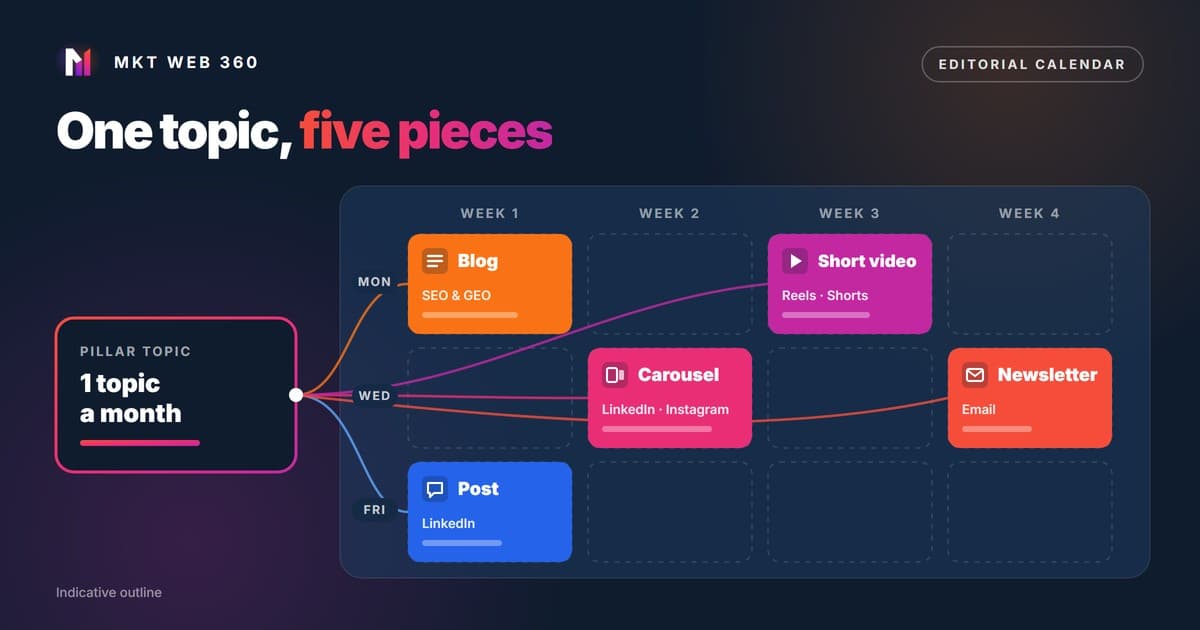
A content strategy decides what you publish, for whom, on which channel and for which business goal. The editorial calendar turns it into dates, formats and owners. Our method: pick one pillar topic a month based on what your customers search for, turn it into five pieces and measure saves, shares and enquiries, not likes.
Quick summary
- ▸A content strategy answers four questions for every piece: which business job it does, who it is for, which channel it goes on and what action it asks for.
- ▸Topics come from what your customers already search for: Search Console, Keyword Planner and the questions they ask you by phone or email.
- ▸One topic, five pieces: a blog article, a carousel, a short video, a newsletter and a text post.
- ▸The editorial calendar is a spreadsheet with date, piece, channel, business job, audience, call to action and metric. The template is below.
- ▸Measure saves, shares and enquiries, not likes.
What is a content strategy, and how is it different from just posting?
It is the plan that links what you publish to what your business sells. Posting without a strategy does not mean posting little: many businesses post often, but each piece goes its own way and nobody knows whether it helps.
| Aspect | Just posting | With a content strategy |
|---|---|---|
| Starting point | “We need to post something this week” | A business goal and a specific customer |
| Topics | Whatever the person posting thinks of | What customers search for and ask |
| Channels | The same piece on every network | Each format adapted to its channel |
| Call to action | None, or “follow us” | One per piece: read, save, write, request a quote |
| Measurement | Likes and followers | Saves, shares, clicks and enquiries |
Our rule for every piece is simple: it needs a business job, an audience, a channel and a call to action. If one of the four is missing, it does not go into the calendar.
Step 1. Why are you publishing, and for whom?
Start with the business goal. Every piece does one of these four jobs:
- ▸Attract: get found by people who do not know you yet, on Google, in AI assistants or in social media search.
- ▸Persuade: answer the doubts and objections that hold back a purchase (price, timing, how you work).
- ▸Convert: lead to a specific action, such as requesting a quote, booking or getting in touch.
- ▸Retain: make existing customers come back, recommend you or buy another service.
Then define your ideal customer with three questions. If you cannot answer them, ask three recent customers:
- 1.What problem do they have just before they look for you, and what words do they use to describe it?
- 2.What stops them from deciding: price, distrust, lack of time, not knowing what they need?
- 3.Where do they look for information: Google, LinkedIn, Instagram, email, an AI assistant?
Step 2. Which topics should you cover?
A pillar topic is a broad subject that matters to your customer and is directly related to what you sell. For a renovation company it could be “how much does a bathroom renovation cost”; for an accounting firm, “which expenses a freelancer can deduct”. Topics come from four places:
- 1.Search Console, Performance report. Look for queries with impressions but low positions: Google already links you to that topic and a better piece can move it up. Sort them by impressions and group them by topic.
- 2.Keyword Planner. It gives you the approximate volume of each search and related searches you had not thought of. We explain it in how to use Google Keyword Planner.
- 3.Real customer questions. The ones you get by phone, email and in sales meetings. If three customers ask the same thing, it is a topic.
- 4.Social media search. Instagram, TikTok and LinkedIn are also used to search. We cover it in social SEO: social networks as search engines.
Twelve topics give you a year of calendar. Rank them by how close they are to what you sell and by search interest, and start at the top.
Step 3. How do you get five pieces out of one topic?
You do not need five different ideas. The blog article is the master piece and the other four adapt part of it to each channel, with their own format and call to action:
| Piece | Channel | Job | Call to action | What to measure |
|---|---|---|---|---|
| Blog article | Website (Google and AI assistants) | Attract searches and be the source that gets cited | Request the audit or see the service | Impressions and clicks per query; enquiries from the article |
| Carousel | LinkedIn and Instagram | Explain the method step by step | Save it and read the full article | Saves and shares |
| Short video | Reels, Shorts, TikTok or LinkedIn video | Show a mistake or a step in under a minute | Follow the account or comment with a question | Shares and complete views |
| Newsletter | Email to your list | Retain and reactivate people who already know you | Reply or book a call | Clicks and replies |
| Text post | Share your view or a case with your judgement | Comment or send a message | Meaningful comments and messages received |
Adapting is not copy and paste. Each channel has its tone: on LinkedIn, an opinion with real judgement works, as explained in LinkedIn for SMEs: a practical guide to generating leads; on the blog, the complete answer. If you use AI for drafts, check the voice with these techniques so your content does not sound like AI.
Social media does not replace the blog. According to IAB Spain's 2026 Social Media Study, 54% of users in Spain already use social networks to look for information before buying online, and the average user visits 7.2 networks. That attention is spread thin; the article on your website is the piece that remains yours and that Google can show. If you do not have a blog yet, see our blog creation service.
Step 4. How do you build an editorial calendar? (template)
This is the template we use, with one example row. Select the table, copy it and paste it into Google Sheets or Excel: each column lands in its own cell.
| Date | Pillar topic | Piece | Channel | Business job | Audience | Call to action | Owner | Status | Main metric | Result |
|---|---|---|---|---|---|---|---|---|---|---|
| 03/11 | How much a bathroom renovation costs | Blog article | Website | Attract | Homeowner comparing quotes | Request a quote | Marketing lead | Draft | Clicks and enquiries | (fill in after a month) |
How to fill it in:
- 1.Choose the month's pillar topic from your topic list, starting with the one closest to what you sell.
- 2.Write the article first. It is the most complete piece and the others come from it.
- 3.Fill in one row per piece, with all eleven columns. If a piece has no clear job or call to action, drop it.
- 4.Assign an owner and a real date, allowing time for review.
- 5.At the end of the month, fill in “Result” with each piece's main metric and decide which format to repeat.
And this is how a month with a single pillar topic is split:
| Week | What goes out |
|---|---|
| Week 1 | Blog article (Monday) and a text post introducing it (Friday) |
| Week 2 | Carousel with the steps from the article |
| Week 3 | Short video about a common mistake on the topic |
| Week 4 | Newsletter summing up the month and linking to the article |
A social media editorial calendar is the same sheet filtered by channel. You do not need another document: add one view per network and you will see at a glance if one is left empty or if you keep repeating a format.
Step 5. What should you measure on each channel?
We measure saves and shares because they say more than a like. Someone who saves a piece plans to come back to it because it solves something for them. Someone who shares it is recommending it to another person. A like takes one tap and tells you neither.
| Channel | Main metric | Supporting metric | Do not use as a goal |
|---|---|---|---|
| Blog | Impressions and clicks for the topic's queries (Search Console) | Enquiries coming from the article | Visits with no context |
| Carousel | Saves and shares | Clicks to the article | Likes |
| Short video | Shares | Share of people who watch to the end, if the network shows it | Views lasting a few seconds |
| Newsletter | Clicks | Replies and unsubscribes | Opens as the only figure |
| Text post | Meaningful comments | Messages and profile visits | Likes |
Review the data once a month with the calendar open: record each piece's result and repeat the formats that work with the next topic.
What do the pieces that AI answers cite have in common?
Google has official documentation; other assistants have no equivalent guide, so we apply the same four traits:
- 1.It answers in the first lines. A direct answer of two or three sentences under the title, before the detail, for the reader in a hurry and for whoever summarises the page.
- 2.It adds something of its own. Google's guide to its AI features asks for original content, with a unique perspective or first-hand experience, not what other pages already repeat.
- 3.It is well organised. Headings that are real questions, tables and lists that stand on their own. Google makes clear there is no need to break text into tiny chunks: the structure is for the reader.
- 4.It is a normal page, indexed and crawlable. According to Google, appearing in AI Overviews or AI Mode does not require special AI files or specific structured data.
Would you rather we did it with you?
In our content marketing service we prepare the topics, the calendar and the pieces. If you first want to know where your website stands, the free audit reviews its technical health, your visibility on Google and in AI assistants, and three search opportunities. You get it by email within 24 business hours at most, with no commitment.
Request the free auditFrequently asked questions
What is the difference between a content strategy and an editorial calendar?
How often should a small business publish?
What tool do I need for an editorial calendar?
Can I use AI to create the content in my calendar?
How long does a content strategy take to show results?
Sources
- IAB Spain: “IAB Spain presenta el Estudio de Redes Sociales 2026” (19/05/2026, with Elogia; accessed 28/10/2026). https://iabspain.es/iab-spain-presenta-estudio-rrss-2026/
- Google Search Central: Optimizing your website for generative AI features on Google Search (updated 10/07/2026). https://developers.google.com/search/docs/fundamentals/ai-optimization-guide
- Google Search Central: AI features and your website. https://developers.google.com/search/docs/appearance/ai-features
- Google Search Central: Creating helpful, reliable, people-first content. https://developers.google.com/search/docs/fundamentals/creating-helpful-content
- Search Console Help: Performance report (Search results). https://support.google.com/webmasters/answer/7576553?hl=en
Related services: Content marketing · Blog creation · Free digital audit