How to measure the traffic you get from AI with Google Analytics 4 and Search Console
Your website may already be receiving visits from ChatGPT, Gemini or Google AI Mode, but they do not all show up in the same place. Here is where each one appears, how to separate them and what to conclude.
Quick answer
Visits from assistants such as ChatGPT, Gemini or Copilot appear in Google Analytics 4 under the default AI assistant channel, and ChatGPT adds utm_source=chatgpt.com to its links. Clicks from Google AI Mode and AI Overviews, however, count as organic search and are visible in Search Console.
Why measure it now
Until recently, traffic from AI tools got lost among “referrals” or “direct” traffic. That has changed for three reasons:
- Google Analytics 4 includes in its default channel group a dedicated channel for AI assistants, grouping sources such as ChatGPT, Gemini, Deepseek, Copilot or Grok.
- OpenAI states in its publisher documentation that ChatGPT automatically adds utm_source=chatgpt.com to the links it sends to websites.
- In June 2026 Google announced generative AI reports in Search Console and in October more links inside AI Mode and AI Overviews. More links mean more visits to measure.
Measuring it answers a very specific question: does the work to appear in AI turn into visits and enquiries, or only into mentions? If you do not yet know whether AI mentions you, start with the GEO audit to check whether you appear in ChatGPT, Perplexity and Google's AI (in Spanish).
Where each AI source shows up
This is the key point of the article: not all AI traffic is measured the same way.
| Source | Where you see it in Google Analytics 4 | Where you see it in Search Console |
|---|---|---|
| ChatGPT | AI assistant channel (source chatgpt.com) | Not shown: it is not Google |
| Gemini, Copilot, Deepseek, Grok | AI assistant channel, according to Google's list | Not shown |
| Perplexity and other assistants | AI assistant if Google recognises them; otherwise Referral (for example, perplexity.ai) | Not shown |
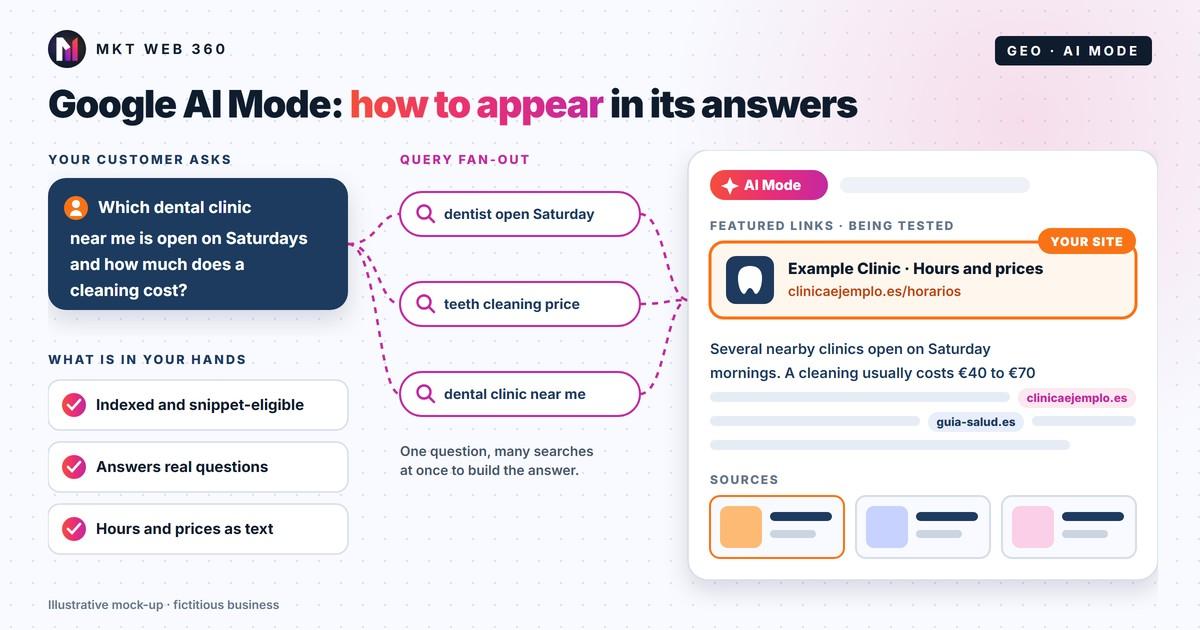
| Google AI Mode and AI Overviews | Organic Search (google / organic), not separated | Performance, search type “Web”; generative AI report if your property has it |
Watch out: according to Google Analytics help, the AI assistant channel does not include Google AI Mode or AI Overviews; those visits go to Organic Search. If you only look at the AI channel, you will underestimate what Google's AI brings you.
Step by step in Google Analytics 4
- 1Go to Reports > Acquisition > Traffic acquisition and choose the “Session default channel group” dimension.
- 2Find the row for the AI assistant channel. If it is not there, you have had no visits classified that way in the selected period: widen the date range.
- 3Add the secondary dimension “Session source / medium” to see which assistant sends each visit (chatgpt.com, gemini.google.com, etc.).
- 4Look at the key events column (forms, calls, purchases): that is where curious visitors and customers part ways.
- 5Also check the Referral channel, filtering by sources such as perplexity.ai, in case an assistant is not on Google's list.
- 6If you want a fixed view, create a custom channel group with an “AI” channel whose condition is that the session source matches a regular expression such as chatgpt|openai|perplexity|gemini\.google|copilot|claude\.ai|deepseek. Place it above Referral so it takes priority.
A warning: some visits from AI apps arrive without source information and GA4 counts them as direct traffic. No tool can attribute them with certainty; bear this in mind before drawing conclusions from small numbers.
Step by step in Search Console
For Google's AI, the source is Search Console. Google explains that traffic from AI features in Search is included in the performance report, under the “Web” search type, together with all other results. In other words, you are already seeing it, but mixed in.
- Performance > Search results: compare periods and look at long, question-style queries. They are the ones most likely to trigger AI answers.
- Pages: identify which URLs gain impressions for this kind of query. They are your most “citable” pages.
- Generative AI report: Google is testing it with a subset of websites. According to the announcement, it shows impressions by page, country, device and date in AI features. If your property has it, use it to see which pages appear in AI Mode and AI Overviews.
How to read the data without fooling yourself
- Few visits does not mean little influence. Many AI answers are read without a click; those mentions are not measured in Analytics. Combine the data with a regular manual review of what assistants say about your business.
- Compare quality, not just volume: conversion rate, pages viewed and engagement time of AI traffic versus organic. Google claims clicks from pages with AI Overviews are higher quality; check it against your own data.
- Look at monthly trends, not individual days. AI answers change a lot from one week to the next.
- Cross-check with real enquiries: ask in your form or on the phone how people found you. It is the data point that best fills the gaps in analytics, as we explain in our marketing attribution guide.
Prerequisite: AI must be able to read your website
None of this works if you block crawlers. OpenAI says that to appear in ChatGPT search answers and track that traffic, you need to allow OAI-SearchBot. For Google, the page simply needs to be indexed and eligible to be shown with a snippet. Check your robots.txt and the tags on your key pages before concluding that “AI brings you nothing”. We cover the rest in what Google AI Mode is and how to appear.
What to do with what you measure
With two or three months of data you will see which pages receive AI visits and whether they convert. The ones that work deserve improvements (more direct answers, updated data, a better call to action); the ones that never appear may need rewriting or merging. If you would like us to set up the measurement and interpret it with you, this is our web analytics service, and to improve visibility, our generative engine optimisation (GEO) service.
Want to know what AI brings you today?
Request the free audit of your website: we review your SEO, your Google Business Profile and your AI visibility, and email you an improvement plan within 24 business hours, with no obligation.
Get my free auditFrequently asked questions
Does Google Analytics 4 separate traffic coming from AI?
How do I know whether a visit comes from ChatGPT?
Where can I see clicks from Google AI Mode?
Why do I get few AI visits if AI mentions me?
Do I need a custom channel group?
Sources
- Google Analytics Help: default channel group. https://support.google.com/analytics/answer/9756891
- Google Analytics Help: custom channel groups. https://support.google.com/analytics/answer/13051316
- OpenAI: Publishers and developers FAQ. https://help.openai.com/en/articles/12627856-publishers-and-developers-faq
- Google Search Central: AI features and your website. https://developers.google.com/search/docs/appearance/ai-features
- Google Search Central Blog: generative AI performance reports in Search Console (June 2026). https://developers.google.com/search/blog/2026/06/gen-ai-performance-reports
- Google: More ways to connect with the web from Search (15 October 2026). https://blog.google/products-and-platforms/products/search/updates-ai-mode-overviews-explore-web/